Twenty ways people use Synatra.
Find yours.Emails, conversations, customer records and working knowledge already contain the next step. Synatra brings them together so people spend less effort remembering, copying and chasing. Distilled from fifty recent customer, coaching and internal conversations, September to October 2026.
Distilled from fifty recent customer, coaching and internal conversations, September to October 2026. Examples are anonymised.
What it comes back to
Remember what matters.
Keep relationships, decisions and commitments available when you need them.
Move the work forward.
Connect an enquiry, meeting or idea with an owner and a next step.
Give AI useful context.
Start from the business information instead of explaining everything again.
Find your reason to use it
Who benefits, what changes, and how it works in practice.
Each card has a plain description and one example of the idea in use.
01. Put customer information somewhere everyone can find it
Customers
Bring contacts and companies out of individual mailboxes, spreadsheets and accounting records into a searchable shared customer database. Nobody depends on whoever happens to remember a name or own the spreadsheet.
Useful for: Companies, especially small consultancies
For example: Bring contacts from email, a spreadsheet and your accounting system together, then find the person and their company in one search.
02. Recover useful relationships hidden in old email
Customers
Review past correspondence for people and companies missing from the CRM, then turn them into usable records. Existing relationships become visible opportunities instead of disappearing when someone leaves.
Useful for: Founders, sales teams and businesses changing ownership
For example: A founder reviews past correspondence and finds useful contacts that never made it into the customer database.
03. Turn an enquiry into an opportunity with a next step
Customers
Create an opportunity from an email or conversation, attach the relevant correspondence, and move it through stages that reflect how the business sells. You see what needs attention instead of losing enquiries in the inbox.
Useful for: Companies selling services or products
For example: An enquiry arrives by email. Create an opportunity, keep the conversation with it, and give it a clear next action.
04. Give AI context about the customer and the business
Knowledge & AI
Let Aria, Claude or ChatGPT retrieve connected contacts, emails, projects, tasks and notes so a request starts with the business context. Less copying, less explaining.
Useful for: Individuals using AI; teams with dispersed information
For example: Ask AI to prepare for a customer conversation using the relevant emails, notes and project history.
05. Turn meetings into agreed work
Work & projects
Record a call or an in-person meeting, extract decisions, dates and proposed actions, then create the tasks, project or notes after review. People concentrate on the conversation and still follow through.
Useful for: Founders, consultants, boards and project teams
For example: After a project meeting, review the suggested actions and turn the agreed commitments into tasks with owners and dates.
06. Turn spoken ideas into useful documents and content
Content & marketing
Dictate an idea or reuse a conversation to draft a brief, blog post, social post, summary email or strategy. Expertise is captured without starting from a blank page.
Useful for: Founders, consultants, coaches and marketers
For example: Talk through an idea on the move, then use the transcript to draft a brief, article or follow-up email.
07. Make personal priorities fit the calendar
Personal & team
See tasks alongside calendars, reserve time for the work, and choose between competing priorities. The same pattern can include personal and family tasks. A realistic plan instead of an unbounded to-do list.
Useful for: Individuals with several roles or businesses
For example: Choose the work that matters today and reserve time for it alongside meetings and personal commitments.
08. Make daily plans and one-to-ones useful
Personal & team
Use daily plans, weekly reflections and person-linked one-to-one records to identify blockers, support needs and commitments. The next conversation starts from what was agreed last time.
Useful for: Managers, staff, founders and coached businesses
For example: A manager prepares for a one-to-one using the previous commitments, weekly reflections and current blockers.
09. Replace project registers and governance checklists
Work & projects
Keep projects, phases, tasks, owners and repeatable checklists together so everyone can see what is due, blocked or complete. No more several people maintaining different versions of the same spreadsheet.
Useful for: Companies managing many projects; construction and service businesses
For example: Start each project with a repeatable checklist, assign owners and see which steps are waiting for action.
10. Know where time went and support accurate billing
Work & projects
Record time against work, relate it to project budgets, and provide the evidence behind an invoice. Spot overspend early and stop reconstructing who did what at month end.
Useful for: Consultants, agencies, project managers and finance teams
For example: A consultant records time as work happens and uses that record to explain the month’s invoice.
11. Reduce repeated work from quote to finance
Work & projects
Reuse customer, product and project information when preparing a quote and the order, purchase order or invoice that follows. The commercial process links to the accounting system instead of retyping the same information.
Useful for: Sales, service businesses and finance teams
For example: Prepare a quote using existing customer and product information, then reuse that information in the next commercial step.
12. Give showroom teams a simpler sales workflow
Customers
Provide a simplified view for email and opportunities while synchronising sales progress with the operational order system. Frontline staff work in a simpler interface without losing the back-office picture.
Useful for: Retail and showroom companies and other frontline teams
For example: Showroom staff follow an enquiry through availability, reservation, payment and fulfilment in a focused view.
13. Manage several inboxes in one place
Personal & team
Read connected mailboxes through a unified inbox while keeping the workspace and customer associations. Less switching, and correspondence stays attached to the correct business.
Useful for: Individuals with multiple roles, companies or email accounts
For example: An operator working across several businesses reads connected inboxes while keeping each conversation with the right customer.
14. Hand over customer correspondence without sharing everything
Customers
Share or delegate the relevant email, thread or mailbox, or show selected company correspondence to colleagues. Another person picks up the relationship while confidential correspondence stays restricted.
Useful for: Teams, account managers and finance colleagues
For example: An account manager shares selected customer correspondence so a colleague can pick up the next step.
15. Reduce inbox noise and show what matters
Personal & team
Classify incoming emails, filter spam, summarise selected categories and identify items needing attention. A daily digest, or invoice emails routed so finance does not have to chase for them.
Useful for: Busy individuals, managers and finance teams
For example: A busy owner groups incoming messages by type and reviews the items that need action.
16. Keep a living business manual
Knowledge & AI
Store procedures, templates, decisions and lessons in notebooks and make them available to people and AI. Work starts from the agreed way of doing things instead of rediscovering it on each person’s computer.
Useful for: Companies, distributed teams and individuals with recurring work
For example: Save the agreed procedure and reusable template in a notebook so a colleague or AI can find it next time.
17. Make existing relationships usable for marketing
Content & marketing
Build usable contact groups from existing correspondence and connect leads, campaigns and follow-up to the CRM. Known relationships become a deliberate business-development process.
Useful for: Small businesses, sales teams and marketers
For example: A small business organises known contacts into useful groups and connects its marketing activity with follow-up.
18. Manage social content and client approvals together
Content & marketing
Keep proposed content, review, scheduling and client visibility in one calendar and portal workflow. Fewer scattered approval messages, and it is clear what is waiting for a decision.
Useful for: Marketing agencies, business owners and clients
For example: An agency shares proposed posts with a client, collects approval and keeps the publishing plan visible.
19. Prepare customer reviews and spot service problems
Customers
Pull relevant correspondence and service evidence together for a customer review, draft invitations and follow-up, and use the available data to identify customer concerns. A better-prepared, more proactive relationship.
Useful for: Account managers, customer-success teams and leaders
For example: Prepare a customer review from correspondence and connected service information, then draft the follow-up.
20. Delegate a defined task and return to a reviewable result
Knowledge & AI
Hand work to an agent that runs in the background with the task and its context, and returns a report or draft. Grouping and prioritising a backlog, processing feedback, longer-running operational work.
Useful for: Founders, operators, researchers and teams with recurring work
For example: Give an agent a defined research or backlog-review task with supporting context, then review the report it returns.
Two of them, in full
What this means in practice.
Number three, an enquiry with a next step, and number six, an idea turned into a document. Both at Harbour Joinery, a fitted-kitchen firm.
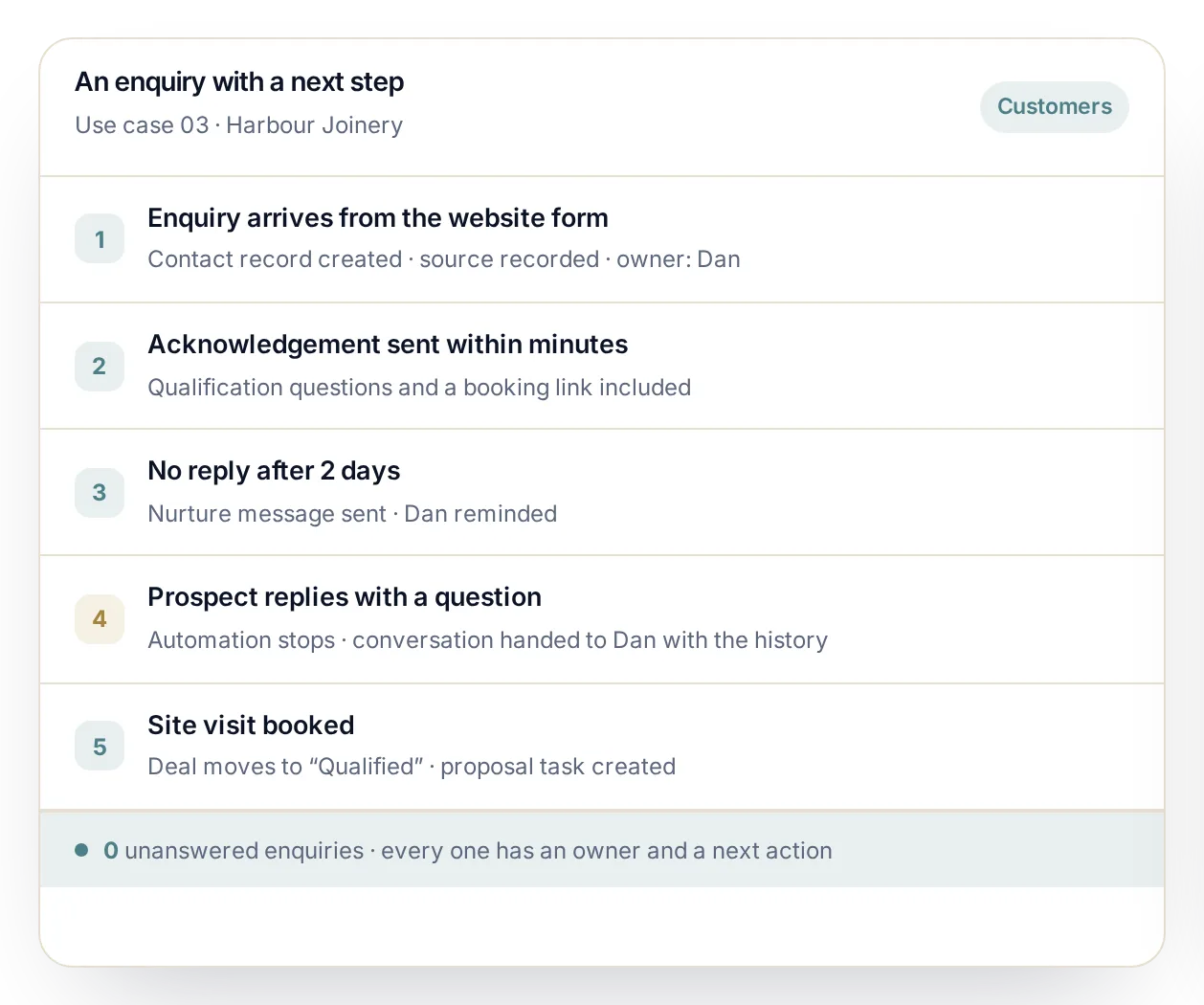
Use case 03 in full: an enquiry with a next step, at Harbour Joinery.
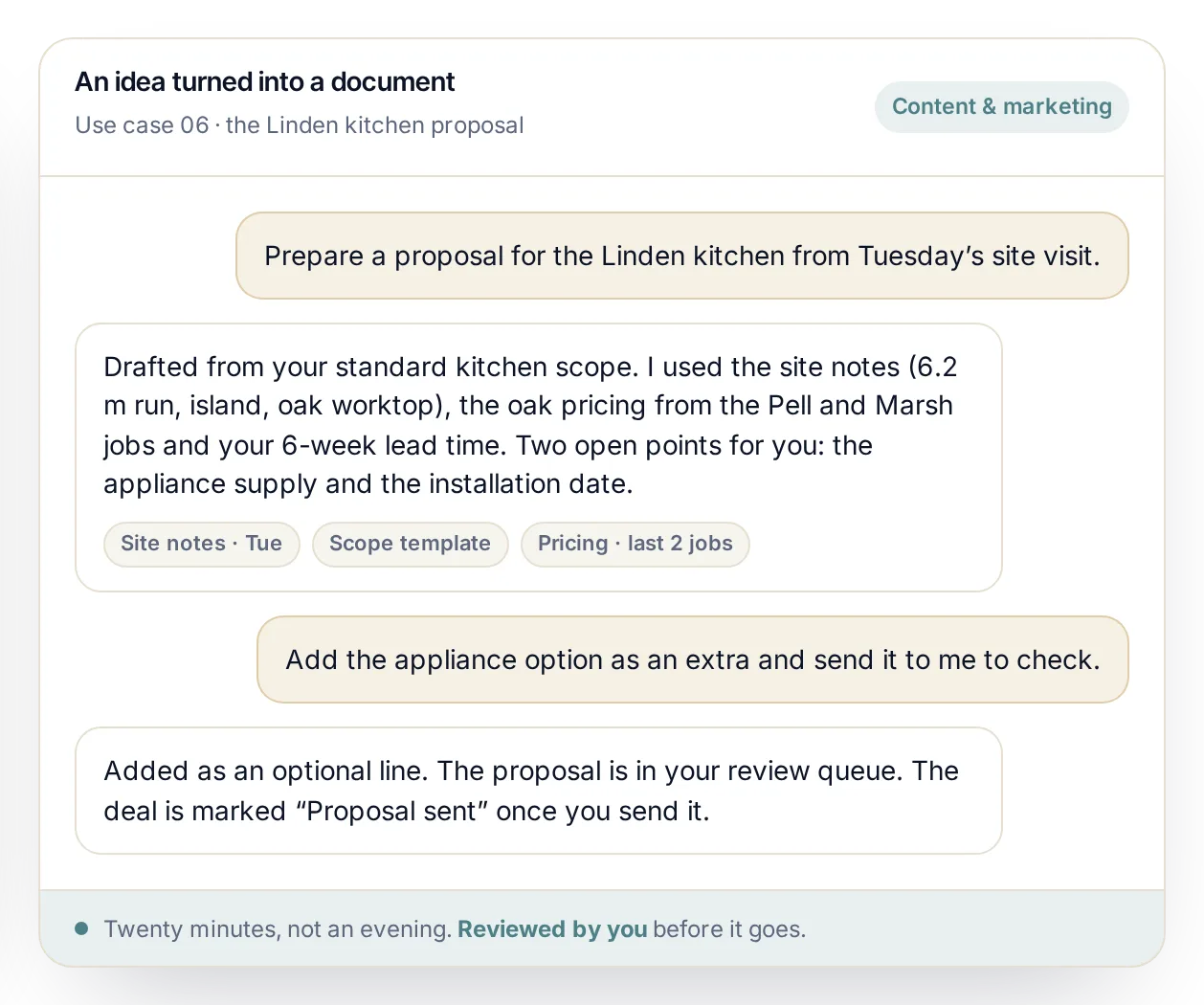
Use case 06 in full: an idea turned into a document. Twenty minutes, not an evening.
A practical starting point
Start with one useful workflow.
Choose a real recurring problem and make the first improvement easy to see. Add more once that workflow is helping.
Bring a useful set of contacts together.
Make the right person, company and relationship easy to find.
Track a genuine opportunity.
Keep its correspondence and give it a clear next action.
Share what a colleague needs.
Help someone else pick up the work with the right context.
Turn a meeting into reviewed actions.
Use the conversation to support follow-through.
Start your engine.
Tell us about your business. We reply within one working day with the brief we would run, what we would set up first and what it costs.
One structured brief. Seven tailored systems. Clear human handovers. No blank pages.